

This guide helps you prepare a smartwatch for international travel so it can provide useful navigation, communication, health tracking, and safety features without relying on a phone connection at every moment. It is for travelers who already own a compatible smartwatch and want to check its capabilities, configure it before departure, and verify key functions. Basic phone and watch settings are enough; allow 45-90 minutes for setup, with extra time for offline downloads.

Get travel and outdoor gear delivered free with Prime
- Fast, free delivery on millions of items
- Prime Video, Amazon Music and more included
- Member-only deals all year

Amazfit Bip 6 Smart Watch, 1.97" AMOLED Display, GPS, iOS/Android
- ✔ Display: 1.97-inch AMOLED
- ✔ GPS systems: GPS, GLONASS, BeiDou, Galileo
- ✔ Navigation: Built-in GPS and free downloadable maps
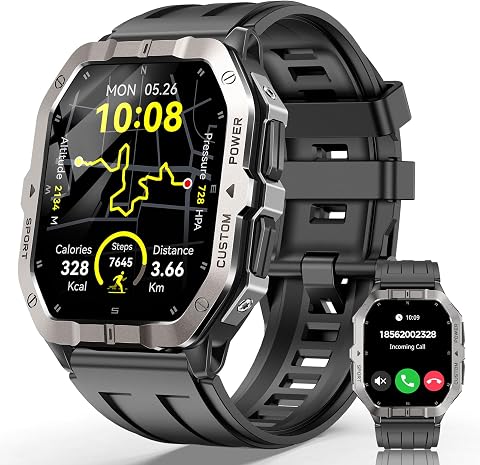
Military Smart Watch for Men – Built-in GPS, 2.02" Fitness Tracker
- ✔ Display: 2.02-inch HD touchscreen
- ✔ GPS: Built-in
- ✔ Battery: 450 mAh; up to 12+ days with calling, 30 days standby claimed

SOUYIE GPS Smartwatch for Men with 1.43-Inch AMOLED Display
- ✔ Display: 1.43-inch AMOLED, 466 × 466
- ✔ Positioning: GPS, BeiDou, GLONASS
- ✔ Outdoor sensors: Compass, barometer, altimeter
Difficulty: Beginner | Time: 45-90 minutes, plus time to download offline data
What You’ll Need
Tools & Materials:
- Smartwatch and its charging cable or charging dock
- Paired smartphone with the watch’s companion app
- Reliable Wi-Fi connection
- Travel itinerary and destination addresses
- Payment card and account details, if using contactless payments
- Destination emergency contact information
Knowledge:
- How to use the watch’s settings and companion app
- How to connect the watch to Wi-Fi or a phone
- How to use the phone’s app store and location settings
Features vary by watch model, mobile carrier, operating system, and destination. Check the manufacturer’s travel and cellular support pages before relying on a feature. A smartwatch is not a substitute for a phone, paper or digital travel documents, or local emergency services.
Amazfit Bip 6 Smart Watch, 1.97" AMOLED Display, GPS, iOS/Android
The Amazfit Bip 6 earns our top spot because it brings together the most balanced travel toolkit here: built-in GPS with support for GPS, GLONASS, BeiDou, and Galileo, downloadable maps, and an AMOLED screen in a lightweight aluminum build. That combination suits travelers who want route support on a walk or day trip without stepping up to the chunkier profile of the military-style watch. Its stated battery life of up to 14 days is also the longest clearly specified claim in this lineup, though frequent GPS use and an always-on screen can change the result.Compared with the SOUYIE, the Bip 6 emphasizes maps, workout options, and a wider stated water-resistance depth rather than a compass, barometer, altimeter, or flashlight. Compared with the Military Smart Watch, it is the more polished everyday travel choice, but its 1.97-inch display is smaller and its build is described as lightweight aluminum rather than military-tested. The main constraint is no cellular connection: Bluetooth calling and many smart functions still depend on a paired phone. Its limited listed memory and RAM also make it a less compelling choice for buyers expecting a broad standalone app ecosystem.
Pros:
- Built-in GPS supports four listed satellite systems for route tracking.
- Free downloadable maps add practical navigation value for unfamiliar areas.
- Bright 1.97-inch AMOLED screen and lightweight aluminum construction suit daily wear.
- Up to 14 days of stated battery life and 50-meter water resistance.
Cons:
- No cellular/LTE connection; many smart features rely on a paired phone.
- Listed 512 MB storage and 64 MB RAM may limit app flexibility.
- Battery performance can fall short of the stated maximum with intensive GPS or display use.
Best for: Travelers who want a lightweight GPS watch with downloadable maps, broad satellite support, and a stated two-week battery target.
Not ideal for: Those who need cellular service, extensive onboard app storage, or dedicated outdoor instruments such as an altimeter and barometer.
Bottom line: We recommend the Bip 6 first for travelers who want the strongest balance of GPS, maps, screen quality, and stated endurance without a bulky outdoor-first design.
“We recommend the Bip 6 first for travelers who want the strongest balance of GPS, maps, screen quality, and stated endurance without a bulky outdoor-first design.”
Military Smart Watch for Men – Built-in GPS, 2.02" Fitness Tracker
When quick legibility and a reinforced feel matter more than a slim profile, the Military Smart Watch for Men makes a strong case. Its 2.02-inch HD touchscreen is the largest display in this group, and the supplied description says it is designed to remain clear in sunlight. That can help when checking a route or notification outdoors, while built-in GPS supports tracking without holding a phone. The metal-alloy bezel, composite body, and claimed heat- and cold-resistance testing position it for rougher itineraries than the lighter Bip 6.Its scale is also the catch: compared with the Bip 6, this watch is more imposing on the wrist, and its stated 2 ATM water resistance is notably less reassuring for swimming than the Bip 6’s 50-meter rating. It does include Bluetooth calling and over 100 sport modes, but the description does not specify multi-satellite support or downloadable maps, so we would not rank it ahead of the Bip 6 for navigation-focused trips. The battery claim reaches up to 12+ days with calling and 30 days on standby; real travel use with GPS and frequent screen checks may reduce that figure. Health measurements are reference tools, not medical readings.
Pros:
- Large 2.02-inch HD touchscreen is designed for visibility in direct sunlight.
- Built-in GPS can track outdoor activity without a phone in hand.
- Rugged construction includes a metal-alloy bezel and stated environmental testing.
- Bluetooth calling, notifications, and 100+ sport modes add everyday utility.
Cons:
- The metal bezel and large case may feel bulky for all-day wear.
- 2 ATM water resistance is a limitation for water-heavy itineraries.
- Battery life may be shorter than the stated maximum during GPS-intensive use.
Best for: Travelers who prefer a large, sunlight-oriented screen and rugged construction for outdoor excursions and active days.
Not ideal for: Those seeking a compact watch, stronger listed water protection, or a clearly specified multi-satellite and map-based navigation package.
Bottom line: We place this model second for travelers who value screen size and a rugged build, while its bulk and 2 ATM rating make it less versatile than the Bip 6 overall.
“We place this model second for travelers who value screen size and a rugged build, while its bulk and 2 ATM rating make it less versatile than the Bip 6 overall.”
SOUYIE GPS Smartwatch for Men with 1.43-Inch AMOLED Display
The SOUYIE GPS Smartwatch is the specialist pick for travelers whose plans include hikes, changing elevations, or outdoor navigation where more than a route line is useful. It combines GPS, BeiDou, and GLONASS positioning with a compass, barometer, and altimeter, giving it a more outdoors-focused instrument set than either the Bip 6 or the military-style watch. A dual-LED flashlight is another distinctive addition for finding items in a tent or handling a dimly lit path, although it should be viewed as a convenience rather than a replacement for a dedicated light.The 1.43-inch AMOLED display is the smallest here, so it is less suited to readers who want the broad glanceability of the military watch’s 2.02-inch screen. Its 670 mAh battery capacity is specified, but no runtime claim is provided; capacity alone does not tell us how many travel days it will last. The 3ATM water rating is also more limited than the Bip 6’s stated 50-meter resistance and is not suitable for diving, hot showers, or high-pressure water. Bluetooth calls and health or activity syncing depend on the Fitbeing app and a phone, making this a better fit for outdoor feature seekers than people wanting the simplest travel interface.
Pros:
- GPS, BeiDou, and GLONASS support positioning across multiple satellite systems.
- Compass, barometer, and altimeter add outdoor context beyond basic route tracking.
- Dual-LED flashlight, AMOLED display, and over 100 sport modes provide useful extras.
- Bluetooth calling and notifications are included.
Cons:
- No stated battery runtime, despite the listed 670 mAh capacity.
- 3ATM water resistance is not intended for diving, hot showers, or high-pressure water.
- Activity syncing and some health features use the Fitbeing app.
Best for: Outdoor-focused travelers who value compass, altitude and pressure readings, multi-constellation positioning, and a built-in flashlight.
Not ideal for: Buyers who want a proven battery-duration claim, a large display, stronger water protection, or minimal reliance on a companion app.
Bottom line: We rank the SOUYIE third overall but favor it over the others when outdoor instruments and a built-in flashlight matter more than maps, screen size, or a clearly stated runtime.
“We rank the SOUYIE third overall but favor it over the others when outdoor instruments and a built-in flashlight matter more than maps, screen size, or a clearly stated runtime.”
As an Amazon Associate we earn from qualifying purchases.
Before You Start
Check whether your watch supports the features you plan to use. Some watches show directions only when paired with a phone; some cellular models need a carrier plan, and that plan may not work abroad. Contact your carrier about international coverage, roaming costs, and supported countries before enabling cellular roaming. Check that the watch and phone are updated, and keep your account passwords and recovery methods available.
Do not assume that contactless payments, emergency calling, satellite communication, or health features work in every country. Confirm availability with the watch maker, payment provider, carrier, and local authorities. Download travel data over Wi-Fi before you leave, and carry a charger and backup way to access your itinerary.
Step-by-Step Instructions
Step 1: Check travel compatibility
Find your watch’s exact model name and confirm which features it supports in each destination. Check cellular bands and carrier support if you plan to use calls or data without your phone. Look up whether your navigation app offers offline maps on the watch or only on the paired phone. Confirm the watch’s charging method and whether the charger works with the power adapter you will take.
Tip: A watch described as cellular may still need a supported carrier plan and may not have service in every country. Do not count on it for emergency contact until you have verified coverage.
Check: You have a short list of features that will work at your destinations and know which ones need a phone, a plan, or an internet connection.
Step 2: Update and test the watch
Connect the watch and paired phone to Wi-Fi, charge both, and install available operating-system and companion-app updates. Open the watch’s settings and check the date, time zone, language, and units. Confirm the watch can reconnect to the phone after you briefly turn Bluetooth off and back on.
Tip: Complete updates at home rather than at an airport or hotel with a weak connection. Keep the watch on its charger if an update requires it.
Check: The watch starts normally, shows the correct date and time, and reconnects to its phone after the test.
Step 3: Set up maps and travel destinations
Install or update the navigation app you intend to use. Add your hotel, arrival airport or station, and other important locations as saved places. Download offline maps for the areas where the app supports them; check that the selected map covers the full region rather than only a city center. If directions depend on the phone, download the map to the phone too and plan to keep the devices connected.
Tip: Map downloads can take time and storage. Use Wi-Fi, keep the device charged, and check the app’s download date or file status before leaving.
Check: You can open the saved locations, and the relevant map appears available offline or the app clearly indicates that it requires a phone or connection.
Step 4: Prepare calls, messages, and roaming
Review the watch’s cellular settings and your carrier’s international plan. Turn on roaming only if your carrier confirms that your plan covers the destination and you accept its charges. If the watch has no usable cellular plan, set expectations: calls and messages may require the paired phone, Wi-Fi, or a supported messaging service. Save key contacts in a format that includes the international dialing code.
Tip: Keep cellular data and roaming off until you have confirmed the cost and coverage. A watch connected to a phone may use the phone’s connection rather than its own plan.
Check: You know what connection each communication feature needs, and the roaming settings match the plan you intend to use.
Step 5: Configure contactless payments
Add a supported payment card through the watch’s wallet app or companion phone app. Complete any bank verification, then check that the card appears on the watch. Confirm with the bank that the card and contactless payments are supported where you are going. Learn how to authenticate a payment and how to remove the card if the watch is lost.
Tip: Do not rely on the watch as your only way to pay. Carry a physical payment card and some local cash, and check any bank travel-notification requirements.
Check: The card is shown as ready for use, and you know the authentication steps and the bank’s process for reporting a missing device.
Step 6: Set up health and safety features
Review emergency contacts, medical information, fall detection, location sharing, and emergency-call settings available on your model. Enter accurate information and test how to access it without placing a real emergency call. Check whether emergency calling needs the phone nearby, cellular service, or a supported satellite connection. Set activity and sleep goals that suit your trip, and confirm the watch’s local emergency feature is available in each destination.
Tip: Do not test by calling emergency services. Use the manufacturer’s instructions or a demo screen, and avoid adding medical details you do not want visible to responders or on the lock screen.
Check: Your emergency contacts and medical details are accurate, and you can describe the connection or location requirements for each safety feature.
Step 7: Adjust battery and notification settings
Choose a battery mode that can last through your travel day. Reduce always-on display brightness, unnecessary wake gestures, and nonessential notifications if needed. Keep notifications for travel alerts, transport, and selected contacts. Review location access for navigation apps and turn off features you will not use, such as continuous workout tracking, if they drain power.
Tip: Battery life drops with frequent GPS use, cellular calls, bright displays, and cold weather. Carry the charger and, for long days, a compatible power bank if the watch can charge from it.
Check: The watch shows an acceptable battery estimate for your expected use, and important travel alerts remain enabled.
Step 8: Run a travel-mode test
Before departure, disconnect the phone from the internet or use the app’s offline mode, then test the saved map and destinations. Try a payment only in a controlled, low-cost purchase if appropriate; otherwise, review the wallet’s ready status. Test Bluetooth reconnection, check the time-zone setting, and confirm that you can find emergency information. Recharge the watch after testing.
Tip: Do not assume airplane mode disables every connection or that a downloaded map includes live traffic. Check the watch’s status icons and app messages.
Check: You can identify which functions still work offline, which require a connection, and what backup you will use if a feature fails.
Common Mistakes to Avoid
- Assuming the watch’s cellular service will work overseas automatically. — Confirm carrier, plan, device, and country support before departure; check roaming costs and test the service if possible.
- Leaving map downloads until travel day or downloading only a small part of the route. — Download maps on Wi-Fi in advance, verify their coverage, and check the offline status in the app.
- Depending on the watch as the only payment or communication method. — Carry a phone, physical payment card, backup contact details, and an accessible copy of essential itinerary information.
- Turning on every notification and tracking feature, then running out of battery. — Keep only useful alerts active, select a suitable battery mode, and bring the correct charger.
Troubleshooting
Problem: Offline maps do not appear on the watch.
Solution:
Check whether the navigation app supports offline maps on the watch itself. Some apps store maps on the phone only. Update the app, confirm the download completed, and keep the phone connected if the watch relies on it for maps or directions.
Problem: The watch cannot connect to cellular service abroad.
Solution:
Check that the destination is covered by your carrier and plan, then review roaming and network-selection settings. Restart the watch and allow it to connect. If coverage is not supported, use the paired phone, Wi-Fi, or offline functions rather than repeatedly changing settings.
Problem: The watch battery drains much faster than expected.
Solution:
Reduce screen brightness and wake frequency, pause continuous GPS tracking, and disable unused cellular or location features. Charge the watch and compare battery use after changing one setting at a time so you can identify the main drain.
Problem: A saved payment card is declined or cannot be used.
Solution:
Check that the card is active, the watch wallet is unlocked or authenticated, and the merchant accepts contactless payments. Contact the bank if the card is blocked or unsupported abroad, and use your backup card or cash.
What Success Looks Like
Your smartwatch is updated, charged, and set to the correct time. Saved travel locations and any supported offline maps are available, and you know which features need a phone, Wi-Fi, or cellular service. Payment and emergency settings have been checked, roaming costs are understood, and you have tested battery-saving settings. You also have backup ways to navigate, pay, communicate, and access essential trip information.
Next Steps
Before each travel day, charge the watch, check for itinerary changes, and confirm that maps and tickets remain accessible. At your destination, review the local time and network connection before relying on alerts or navigation. After the trip, turn off roaming or location sharing you no longer need, remove temporary travel cards if appropriate, and review any health or activity settings changed for the journey. Contact your carrier or the watch manufacturer for help if a feature fails despite confirmed compatibility.
Frequently Asked Questions
Can I use a smartwatch abroad without my phone?
Some watches support standalone cellular, GPS, payments, or offline features, but capability depends on the model, plan, destination, and app. Check each feature separately; many watches still need a paired phone for setup, maps, or messages.
Do smartwatch GPS and maps work without mobile data?
GPS positioning may work without mobile data, but map details and route instructions may require a downloaded map or a connected phone. Test the navigation app offline before travel and confirm what it stores on the watch versus the phone.
Will contactless payment work in every country?
No. The watch, card issuer, payment network, and merchant all need to support the transaction. Check with your bank and carry a physical card or cash as a backup.
Should I enable cellular roaming on my watch?
Enable it only after your carrier confirms that the watch and plan are covered in your destination and you understand the charges. If the plan does not support international roaming, leave it off and use other connection options.